Getting started
From a fresh machine to your first spectrum and your first gain: install the stack, run the examples in the right order, read the outputs, then start your own case. Assumes linear algebra, MPI, and a Unix shell; no prior experience with this codebase needed.
Time budget: install takes 30 to 90 minutes (PETSc and SLEPc compile from source). Example 0 runs in under a minute. The Blasius example takes a few minutes on a workstation.
The order that works:
Install with install.sh (or conda if you already live there).
Run example 0. It needs no external data and proves the numerics import chain.
Fetch the LinStab2D reference data, run example 1, read its plots.
Run the rest of the family through the runner script.
Write your own YAML case and run it through the driver or a module.
Math conventions used on this page: temporal eigenvalues are \(\omega = \mathrm{eig}(i L_0)\) with \(\exp(-i\omega t)\) time dependence, so \(\mathrm{Im}(\omega) > 0\) means growth. The resolvent is \(H = C F (L_0 - (\gamma + i\omega) I)^{-1} F B\). You need these two lines to read any spectrum or gain plot below.
What you need before you start
Operating system. Linux is the reference path. macOS works with one BLAS caveat (see macOS and clusters in brief). Windows is not supported. The installer expects a POSIX shell with bash.
Compilers and tools. C, C++, and Fortran compilers, plus make, cmake, curl, and pkg-config. One MPI stack with development headers (mpicc, mpicxx, mpifort, mpiexec). Optional: HDF5 development files, only if you want the MATLAB v7.3 parity tooling.
The one rule that saves hours. One MPI stack per install. PETSc, SLEPc, mpi4py, petsc4py, slepc4py, and the mpiexec you run with must all come from the same MPI family. Mixing Open MPI headers with an MPICH launcher is the most common broken install. install.sh --diagnose exists to catch exactly this before anything compiles.
Disk and time. The build directory (.venv) holds a full PETSc and SLEPc. Expect several GB and a long compile on first install. Later installs reuse the pattern and go faster.
Install path A: the reference script
install.sh is the supported workstation build: default Python 3.13, PETSc 3.24 with MUMPS, complex scalars, editable install of this repo into .venv. Run four commands in this order.
git clone https://github.com/openfluids/linstabpy.git
cd linstabpy

bash install.sh --diagnose
bash install.sh
bash install.sh --check
bash benchmark.sh
What each step proves:
| Step | What it does | Success looks like |
|---|---|---|
--diagnose |
Read-only host preflight. Checks compilers, MPI launchers, headers, dual-MPI conflicts, and that mpiexec -n 1 /bin/true works. Installs nothing. |
 No errors. If it complains, fix the host first. No errors. If it complains, fix the host first. |
install.sh |
Creates .venv, builds or installs Python with PETSc and SLEPc, repairs mpi4py when the wheel ABI mismatches your MPI, installs this repo editable. |
Ends without error. It never calls sudo unless you opt in (see knobs below). |
--check |
Verifies petsc4py and slepc4py import, PETSc uses complex scalars, and a tiny SLEPc non-Hermitian Krylov-Schur solve works from Python. |
All probes pass. A real-scalar PETSc or a failed NHEP probe means the env is unusable for this code. |
benchmark.sh |
Runs a small benchmark (example 0 plus a small example 1) and writes artifacts under benchmark_runs/<run-id>/. |
A fresh run directory with a summary CSV and logs. |
Useful variants:
bash install.sh --force            # wipe .venv and rebuild everything
bash install.sh --force --latest   # same, but newest compatible releases instead of pins
Read the log, do not guess
A healthy install prints which MPI launcher configured PETSc and SLEPc, which launcher verified them, the resolved MPI library directory, and single-rank and multi-rank check results. If those paths point at different MPI families, wipe and rebuild from a clean environment. Do not paper over a mixed MPI install with LD_LIBRARY_PATH.
Knobs you may need (all in the README with full detail):
| Variable | When to set it |
|---|---|
LINSTABPY_AUTO_INSTALL_SYS_DEPS=1 |
Let the script call your package manager for missing Linux system tools. |
LINSTABPY_SKIP_SYS_DEPS=1 |
Skip system dependency checks on provisioned cluster nodes. |
LINSTABPY_MPI_STACK=intelmpi |
You already loaded Intel MPI and want it used. |
LINSTABPY_PETSC_MPIEXEC=/path/to/mpiexec |
PETSc configure hangs or picks the wrong launcher. |
LINSTABPY_VERIFY_MPIEXEC=/path/to/mpiexec |
Install-time checks need a different launcher than configure. |
LINSTABPY_MPI4PY_NO_BINARY=1 |
Force mpi4py to build from source against your active MPI. |
LINSTABPY_WITH_H5PY=1 |
Also install h5py for MATLAB v7.3 file tooling. |
Three launcher knobs, three jobs: LINSTABPY_PETSC_MPIEXEC picks the launcher PETSc/SLEPc configure probes, LINSTABPY_VERIFY_MPIEXEC picks the launcher install-time checks run under, and LINSTABPY_MPIEXEC picks the launcher run_all_examples.sh uses. Each defaults to the auto-detected working launcher; set them only when the probe picks the wrong MPI family. benchmark.sh re-exports its resolved launcher as LINSTABPY_MPIEXEC (and its interpreter as LINSTABPY_PYTHON_BIN) for its child runs.
Run everything through .venv/bin/python directly (scripts should do this so logs show the interpreter). For interactive shells, source .venv/bin/activate is convenient.
Install path B: conda
Pick conda if you already manage environments that way and want to skip the PETSc compile. conda-forge supplies Python with a complex-scalar PETSc, SLEPc, and mpi4py stack. pip then installs only this package, editable, with --no-deps so it never pulls a second NumPy or compiles PETSc.
# Unset these first. A leftover PETSc prefix binds petsc4py to the wrong build.
unset PETSC_DIR PETSC_ARCH SLEPC_DIR

conda env create -f environment.yml
conda activate linstabpy
python -c "import numpy as np; from petsc4py import PETSc; assert np.issubdtype(PETSc.ScalarType, np.complexfloating)"
That assert is the whole gate. If it fails, the environment cannot run this code even though import linstabpy still works (plain import never touches PETSc by design).
Constraints to know:
- Python is
>=3.10,<3.14here. Python 3.14 stays aninstall.shfreshness test; conda-forgepetsc4pymay not resolve it. - Never add
petsc4py,slepc4py, ormpi4pyto the pip list. Those sdists compile PETSc from source and fight the conda MPI stack. environment.ymlis not a second reference build. If conda-forge PETSc differs in minor version from theinstall.shbuild, record both versions with your results.- There is no
environment-gpu.yml, deliberately. GPU PETSc is not a supported conda path. See What is still missing for the current GPU status.
The CLI as it really is
This section corrects a mistake that lived in older docs. The linstabpy command takes no case arguments. It reads everything from environment variables and caches results by config hash. From src/linstabpy/driver/cli.py, the only flag is --version.
linstabpy --version        # light: prints version, never initializes PETSc or MPI
linstabpy                  # full run; config and output come from env (below)
python -m linstabpy.driver.cli   # same entrypoint as a module
| Variable | Default | Meaning |
|---|---|---|
LINSTABPY_CASE_CONFIG |
./configs/parity_config.yaml |
YAML case file. Legacy aliases LINSTABPY_CASE2_CONFIG, LINSTABPY_CASE1_CONFIG also work. |
LINSTABPY_CASE_OUTPUT_NPZ |
{prefix}_{config_md5}_{git_sha8}.npz in cwd |
Where the result archive lands. Per-run aliases exist too. Set a unique path per concurrent run. |
LINSTABPY_CASE_LOG_PREFIX |
linstabpy |
Prefix for log lines and the default output stem. |
LINSTABPY_FORCE_RECOMPUTE |
unset | Set to 1, true, yes, or on (case-insensitive) to skip the cache check and recompute. CLI gate only; library driver.run callers always compute. |
LINSTABPY_STAGE_HEARTBEAT_SECONDS |
30 |
Progress heartbeat interval for long stages. |
A typical MPI run:
export LINSTABPY_CASE_CONFIG=cases/my_case.yaml
export LINSTABPY_CASE_OUTPUT_NPZ=results/my_case.npz
mpirun -n 4 linstabpy
Unknown arguments warn, then are ignored
The CLI uses parse_known_args, so linstabpy run case.yaml does not error. It prints a warning on stderr (rank 0 only) — for bare words and --style options alike — then runs with the env config and drops your words on the floor. If a run used the wrong case, this is the first thing to check. Single-dash PETSc options (plus one following value, e.g. -ksp_rtol 1e-8) still pass through to the solver stack.
Caching behavior: on rank 0 the driver loads the existing output NPZ if present and compares its stored config hash and git SHA against the current ones. Match means it prints Cache valid and skips the compute. Mismatch or unreadable file means it recomputes. In parameter sweeps, either point each run at its own output path or export LINSTABPY_FORCE_RECOMPUTE=1 deliberately.
Most examples in examples/ do not go through this CLI. They run as Python modules with their own YAML files (next sections). The driver CLI is for packed-field cases and campaign use.
macOS and clusters in brief
macOS. Same four commands as Linux. One extra step first when possible:
Reason: PETSc-downloaded ScaLAPACK can resolve LAPACK symbols to Apple Accelerate inside a Python process, which aborts Python slepc4py NHEP solves inside Accelerate ZLADIV. The installer prefers Homebrew OpenBLAS and ScaLAPACK at configure time and wraps .venv/bin/python so the right BLAS loads first. install.sh --check runs a tiny NHEP probe that catches this before examples run. On macOS, always use .venv/bin/python directly, never uv run, which can bypass the patched layout.
Clusters. Load compiler and MPI modules first so the scripts see the same mpicc, mpicxx, mpifort, and mpiexec you will run with:
module load <compiler-module> <mpi-module>
bash install.sh --diagnose
bash install.sh
bash install.sh --check
For Intel MPI with oneAPI, source setvars.sh, export LINSTABPY_MPI_STACK=intelmpi plus the I_MPI_CC/CXX/F90/FC compiler variables, then run the same sequence. Full commands live in the README install section.
Thread policy for every MPI run. One thread per rank unless you are benchmarking deliberately:
export OMP_NUM_THREADS=1 MKL_NUM_THREADS=1 OPENBLAS_NUM_THREADS=1
export NUMEXPR_NUM_THREADS=1 VECLIB_MAXIMUM_THREADS=1
Without this, each rank spawns a full BLAS thread pool and sparse direct solves get slower, not faster. More ranks are not automatically faster for factorization either. Compare rank counts on your machine.
First run: example 0, no data needed
Example 0 validates curvilinear derivatives. It is pure NumPy, runs single-process, and needs no reference files. Run it first. If it fails, the problem is your Python environment, not MPI or data.
Outputs, next to the script: example_0_curvilinear_validation.npz (numbers), .log (run log), and PNGs including the curvilinear mesh figure and a field-derivative triptych. Open the triptych. It shows the test field and its discrete derivatives on the deformed mesh. This is also your first look at the SBP operators in action: the derivatives stay clean at boundaries, which is the whole point of the validated closures.
Re-plot any time without recomputing:
Second run: Blasius resolvent
Example 1 is the real first science run: resolvent gains with optimal forcing and response modes for a compressible Blasius boundary layer (\(Re = 6.0\times 10^5\), \(Ma = 0.3\), SBP order 4, grid \(300 \times 100\)). It needs one external file, the MATLAB base flow BL_BF.mat, which this repo does not bundle.
Fetch the reference data once:
git clone https://github.com/LinStab2D/LinStab2D.git ~/linstab2d-reference
export LINSTABPY_BASEFLOW_DATA_DIR=$HOME/linstab2d-reference
Without that variable, the example raises FileNotFoundError telling you to set it. Put the export in your shell profile if you run these often. The Song and Savarino cases ship their own data or fetch scripts and never read this variable.
Run the case, then the plots:
.venv/bin/python -m examples.martini.example_1_blasius
.venv/bin/python -m examples.martini.example_1_plots
What you get:
example_1_blasius.npz: gains, forcing and response modes, mesh, Chu weights, BC provenance, solver metadata. Load withnumpy.load. The key names form a compatibility surface documented indocs/runtime_npz_contract.md.example_1_blasius_baseflow.png: the mean flow you linearized about. Always look at this before trusting modes.example_1_blasius_modes_forcing_response_{u,v}[_imag]_mosaic.png: one mosaic per component. Each shows the optimal forcing (what to inject), the response (what grows), and their imaginary parts.
How to read the mosaic: the forcing panel is the input shape \(v\), the response panel is \(u = Hv/\sigma\), and the gain \(\sigma\) printed on the figure is their energy ratio in the Chu norm. A large gain with a clean, smooth mode pair is the expected picture. Noise or grid-scale wiggles point at resolution, filter, or boundary setup, not at the solver.
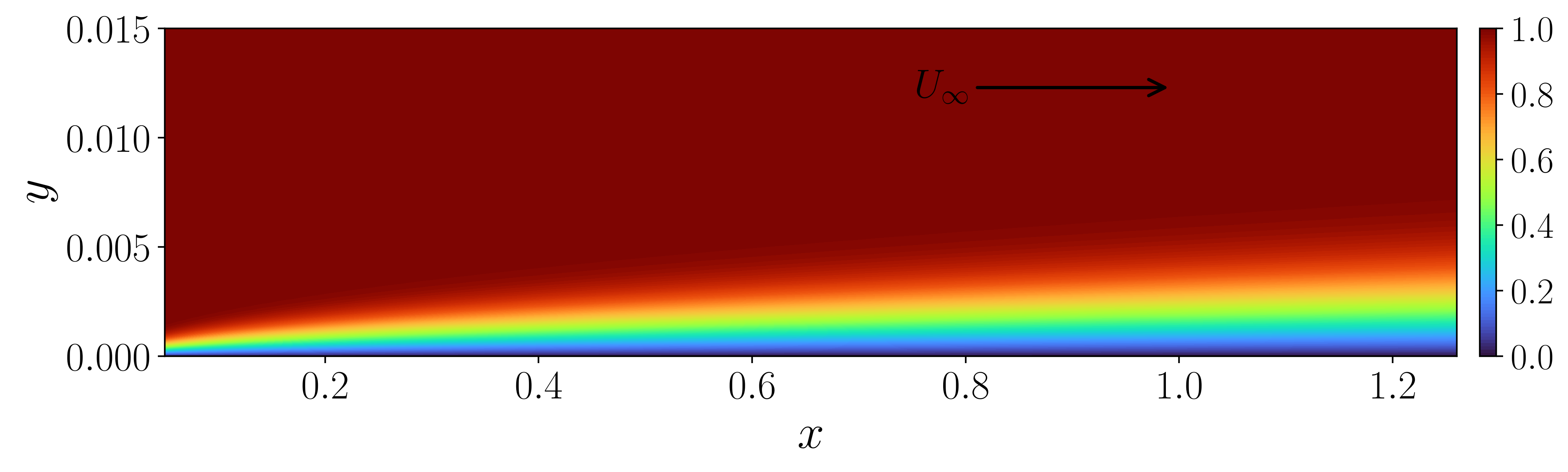
The mean flow you linearize about. Always look at this before trusting modes.
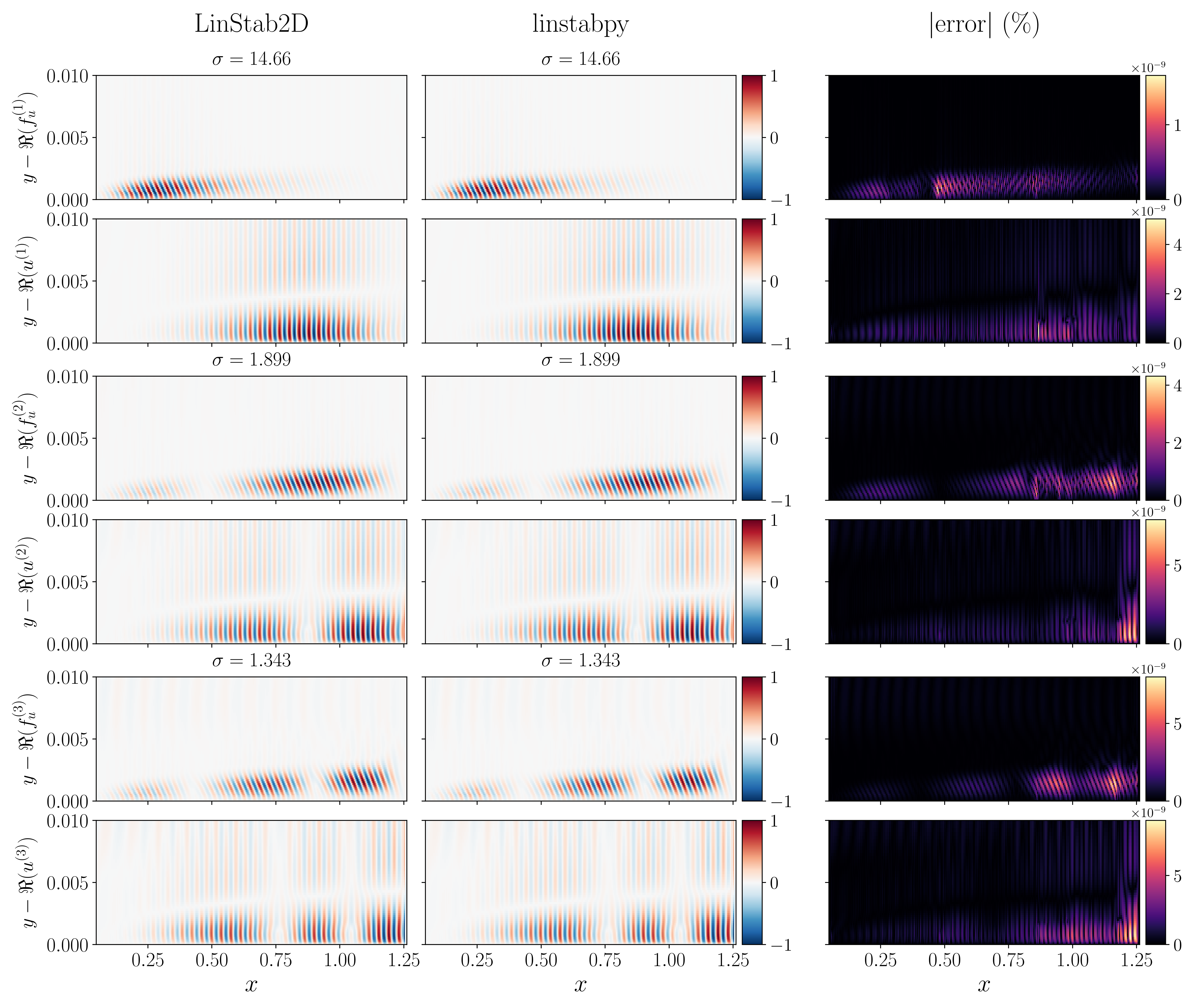
What a healthy answer looks like: smooth, cleanly separated forcing and response structures. Compare your run against this before tuning anything.
The case definition lives in examples/martini/example_1_blasius.yaml: physics, grid, sponge, frequency, mode count, BC recipe, solver policy, each with a comment. YAML keeps the explanation next to the knob, which is why the repo uses it instead of long flag lists. Your first own case walks a trimmed version.
The example family map
Six Martini examples form the core family. Run one, run all, then compare against MATLAB:
bash run_all_examples.sh --list        # what exists
bash run_all_examples.sh --example 1 --skip-parity   # one example, no MATLAB check
bash run_all_examples.sh               # everything plus parity and plots
| # | Module | What it teaches | Needs |
|---|---|---|---|
| 0 | example_0_curvilinear_validation |
SBP derivatives on deformed meshes | Nothing. Pure NumPy. |
| 1 | example_1_blasius |
Resolvent gains, forcing and response | BL_BF.mat via data dir |
| 2 | example_2_jet |
Resolvent on a turbulent jet base flow | M09jet.mat via data dir |
| 3 | example_3_streaky_bl |
Temporal and spatial EVP plus Floquet options | MATLAB fixtures for plots |
| 4 | example_4_cavity |
Direct and adjoint eigenvalues, spectra | Step_BF.mat via data dir |
| 5 | example_5_paraboloid |
Resolvent on a 3D body-fitted mesh | Paraboloid_BF.mat via data dir |
Each example has a matching example_N_plots.py that renders figures from the NPZ without recomputing. The runner calls compute then plots automatically. Direct module invocation writes the NPZ only.
MPI form, with PETSc options passed after --:
bash run_all_examples.sh --mpi -n 10 -m examples.martini.example_3_streaky_bl
bash run_all_examples.sh --mpi -n 1 -m examples.martini.example_1_blasius -- -eps_monitor
Without -n, the runner defaults to half the detected physical cores. Override the launcher with LINSTABPY_MPIEXEC and the rank count with LINSTABPY_MPI_RANKS when the machine needs explicit paths. Interpreter: LINSTABPY_PYTHON wins over LINSTABPY_PYTHON_BIN, else .venv/bin/python.
Beyond Martini, three case families cover harder ground. Leave them for week two:
| Family | What it is | Data story | How to run |
|---|---|---|---|
examples/song/ |
Song and Robinet SWBLI global stability, \(\theta = 32°\) | Ships packed song_32deg.npz for checks; full pipeline needs Plot3D grid.grd + mean_flow.dat in inputs/raw/ |
prepare_baseflow, plot_baseflow, then mpiexec -n 4 python -m examples.song.song --config ... |
examples/sawtooth/ |
Lui 2022 suction-side SWBLI, stride-2 field | Ships packed sawtooth.npz (\(300 \times 340\)) |
Baseflow figure, mpiexec -n 4 EVP run, spectrum figure. See its README. |
examples/savarino/ |
30.8° SWBLI resolvent gain maps and backend benchmarks | fetch_zenodo.py downloads the Tecplot base flow |
Slurm campaign scripts. Validation and speed reproduction, not new physics. |
examples/prescribed_forcing/ |
Forcing demos | Local | Small demos, see directory. |
Parity checks compare Python results against MATLAB reference exports:
Missing reference bundles skip cleanly here (silent in CI) and validate when present locally. The pytest parity marker behaves more strictly; see Verify with tests and benchmarks.
What things cost
No maintained per-example runtime table exists yet, but two measured anchors calibrate expectations. Both come from the Savarino case on one c9 node (dual Xeon Silver 4210R, 20 cores, MKL), August 2026, recorded in examples/savarino/*.csv with commit, ranks, and Slurm job per row.
Single resolvent point, Mack point, 450,000 unknowns, 23.4M nonzeros, MUMPS (strong scaling, jobs run serially):
| Ranks | Wall (s) | Peak RSS (GiB) | Gain |
|---|---|---|---|
| 4 | 190.5 | 18.6 | 179.1173862845 |
| 8 | 154.6 | 25.4 | 179.1173862854 |
| 16 | 148.2 | 40.6 | 179.1173862846 |
Read it as: gains identical to 10 digits, ranks 4 to 16 buy 22 percent less time for twice the memory. Factorization dominates; more ranks are not automatically faster.
Full 200-point gain map, same hardware, 5 jobs concurrent on 20 cores: 83.6 minutes as independent per-point jobs, 59.7 minutes through the line driver with anchor reuse. The router earns its keep on dense grids.
Measure your own runs the same way: benchmark.sh writes wall times and logs under benchmark_runs/<run-id>/, and every result NPZ carries cost_wall_* keys plus provenance. When reporting a slow machine, send those plus the --diagnose output.
The tutorial PDF
docs/tutorial/tutorial.pdf walks the Martini examples figure by figure. Section 5 explains how to read the baseflow, spectrum, and mosaic figures. The PDF is not tracked in git, so build it:
make clean removes build artifacts. If you lack a TeX distribution, the example PNGs plus Second run: Blasius resolvent cover the same ground without the prose.
Your first own case
You have two ways to run custom work. Example modules for MATLAB-parity style studies with generated meshes. Packed-field cases through the driver for your own base flows. This section sketches the packed-field route, which is the one new research takes.
A case is a YAML file plus baseflow arrays. The YAML names physics, grid, sponge, boundary recipe, analysis targets, and solver policy. The baseflow is eight arrays with fixed names: x, y, rho, u, v, w, T, sponge. The loader reads either an npz archive or a directory of npy files. It never guesses filenames; the YAML names the file.
Trimmed from the Blasius YAML, the shape of every case:
Re: 6.0e5        # Reynolds number, rho_ref U_ref L_ref / mu(T_0)
Ma: 0.3          # Mach number, U_ref / sqrt(kappa R T_ref)
Pr: 0.7          # Prandtl number
kappa: 1.4       # heat capacity ratio (gamma in most textbooks)
T_0: 273.15      # freestream static temperature [K]

nx: 300
ny: 100
fd_order: 4      # SBP interior order: 2, 4, 6, or 8

sponge:
  amplitude: 5.0
  xs_trans: 0.02
  # ... ramp widths and offsets that keep outgoing waves from reflecting

bc:
  penalty: 1.0e4
  recipe:
    - {type: dirichlet, borders: lrbt, variables: uvwT}

solver:
  # eigen targets, tolerances, backend selection
Three details that bite newcomers:
- Nondimensionalization is convective. Density, velocity, and temperature equal 1 in the freestream. Pressure never appears explicitly; the nondimensional ideal gas law is \(p^* = \rho^* T^* / (\kappa Ma^2)\). If your base flow comes from an acoustically scaled LES code, convert first. The README nondimensionalization section has the exact factors.
- Boundary recipes are data. Each rule names a type (
dirichletorneumann), border letters (l,r,t,b, combined likelt), and variable blocks (u,T,ruvw,ruvwT). Neumann rules usually wantexclude_corners: trueand, on deformed meshes,curvilinear_normals: true. Assembly applies BC rows last and publishes the free degree sets downstream solvers must use. Thepenaltybeside the recipe pins Dirichlet DOFs (diagonal value after row and column zeroing) and scales Neumann rows; keep the default unless leakage diagnostics complain. Full mechanics in core concepts. - The dissipation epsilon has two halves. Building the dissipation operator and setting its strength are separate flags, and setting only one is a silent no-op. The Workflow page documents the exact pair. On rectilinear meshes you usually want it off; on meshes curved in both directions you usually want it on.
Run the case through the driver (The CLI as it really is for the env vars), then inspect the archive:
import numpy as np
d = np.load("results/my_case.npz")
print(d["omega"])          # temporal eigenvalues near your target
print(d["gains"])          # resolvent gains, if a resolvent stage ran
print(d["provenance_config_hash"], d["provenance_linstabpy_git_sha"])
Keep the YAML next to the NPZ. That pair, plus the git SHA inside the archive, is what makes the run reproducible and is what the stability acceptance postchecks (docs/runtime_npz_contract.md) validate against.
Before trusting any spectrum, check the basics the README lists in full: requested nev versus converged nconv, subspace size ncv, EPS tolerance and convergence test, postcheck residuals, boundary leakage, and target distances. Converged Ritz pairs with bad full-operator residuals happen on interior non-Hermitian problems, and the postcheck is what catches them.
Verify with tests and benchmarks
The test suite has three lanes:
.venv/bin/python -m pytest --collect-only tests   # what exists
.venv/bin/python -m pytest tests/                 # default lane
LINSTABPY_MATLAB_PARITY=1 .venv/bin/python -m pytest -m matlab_parity   # MATLAB comparisons
Deliberate semantics: parity tests are deselected by default, not skipped, so they never pad the skip count. Every skip in a default run names an absent optional backend (STRUMPACK, CUDA, superlu_dist) on your machine. But once you request parity with the env var, a missing reference is a  failure, not a skip. A requested comparison that silently does nothing is worse than useless.
Tracked files must stay under 60 MiB each:
Large generated outputs, raw MATLAB exports, and machine-local benchmark products stay out of git. Regenerate or archive them externally.
benchmark.sh artifacts live under benchmark_runs/<run-id>/ with a summary CSV and logs. Send those plus full --diagnose and install output when reporting a broken machine.
Troubleshooting quick map
| Symptom | Likely cause | First check |
|---|---|---|
MPI compile failure, mpi.h missing |
Missing dev headers | Install your MPI stack dev package (for example libopenmpi-dev), or load the full cluster module. |
| PETSc built against one MPI, launched with another | Dual-MPI environment | Pick one stack, put it first in PATH, wipe .venv, reinstall. Never mix. |
mpi4py import fails after switching MPI |
Wheel ABI mismatch | Wipe .venv, then LINSTABPY_MPI4PY_NO_BINARY=1 bash install.sh. |
| Python NHEP solve aborts on macOS, C SLEPc works | Accelerate LAPACK interposition | brew install openblas scalapack, reinstall, use .venv/bin/python only. |
| PETSc configure hangs | Wrong launcher probed | LINSTABPY_PETSC_MPIEXEC=/path/to/working/mpiexec bash install.sh. |
Example raises FileNotFoundError for .mat |
Data dir unset | Clone LinStab2D, export LINSTABPY_BASEFLOW_DATA_DIR. |
linstabpy ran the wrong case |
Args ignored (stderr warning, exit 0) | The CLI takes no case args. Set LINSTABPY_CASE_CONFIG and rerun. |
| Stale results reused | Cache hit | Check for the Cache valid line. Set unique output paths or LINSTABPY_FORCE_RECOMPUTE=1. |
| Factor crash or OOM | Backend, ranks, or memory | Verify backend build, raise ranks, consider BLR options, check BC setup. |
The README troubleshooting section carries the full commands for each row.
What is still missing
Honest gaps, so you can plan around them:
- No GPU install path.
cudss(throughnvmath-python, wrapped around FGMRES) is the validated GPU route and matches MUMPS to 1e-12 on tested cases, but there is no one-command GPU environment.install.sh --stack gpu-strumpack --dry-runonly prints a plan. CPU with MUMPS stays the default you should build on. - No Windows support. POSIX shell and Unix MPI are assumed throughout.
- Reference
.matfiles are external. The four Martini base flows live in a LinStab2D clone you fetch yourself. Nothing in this repo vendors them, for provenance and size reasons. - No per-example runtime table yet. Wall times depend on grid, ranks, and backend. The example family map has Savarino reference anchors (single point scaling plus a 200-point map) and the measurement protocol; Martini per-example timings are still unmeasured contributions welcome.
- Tutorial PDF needs a TeX toolchain.
pdflatexmust be installed to build it. There is no hosted HTML version of the tutorial. - Spatial and map entry points are library-first. Temporal EVP and single-frequency resolvent have the smoothest CLI story. Spatial solves and \(\beta\) and \(\omega\) maps are best driven through module entry points and the
resolvent_mapAPI today. - Error messages assume context. Backend probing fails loudly (good), but some PETSc-level errors still surface raw. Paste them with the benchmark artifacts when asking for help.
Where to go next
- Run the family: example family map commands, then the parity comparison.
- Read the Overview for scope and vocabulary.
- Read the Workflow before writing your own YAML. It documents stage order, the dissipation pair, and acceptance gates.
- Open one module guide package note when you need math or code detail. Start with LNSE Operator Assembly or Resolvent Analysis.
- Keep the Boundaries page open while building cases. It lists every env var, flag, and output key.
- Open the solver glossary beside any solver output.
- Citing results: see Cite linstabpy and the references page. The glossary defines
KSP,PC,EPS,ST, andMatShell, with links to the official docs.
If something on this page failed for you, that is a documentation bug worth reporting. Say which section, paste the command and the error, and attach the --diagnose output.